
Text

Remove Text from Image

Use AI to remove text from image files without cropping away the scene. Brush over a caption, date stamp, or handwritten note, compare the filled background, and download your PNG.

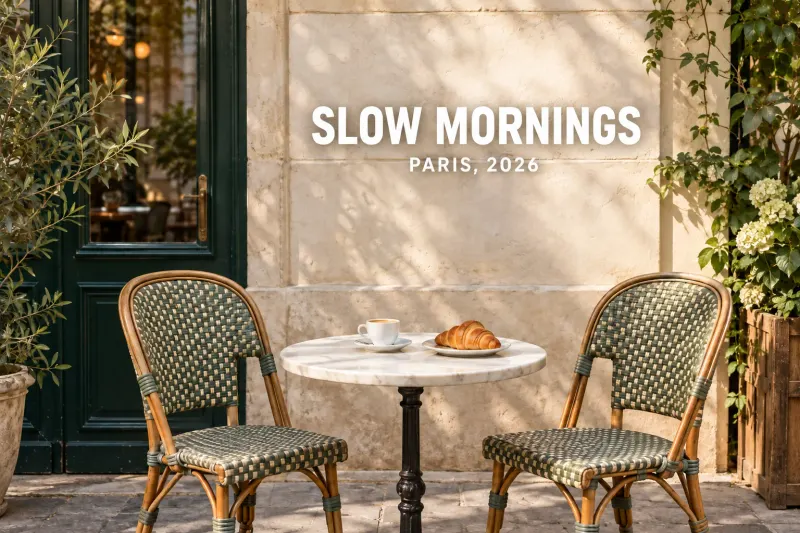
Parisian café photograph with a caption removed from the stone wall.OriginalEdited
AI example · drag to compare

Start with a photo.

or drop an image here

JPG, PNG or WebP · up to 10 MB
Try an example
You choose what disappearsYour photos stay out of public galleriesSee the difference
WHAT WOULD YOU REMOVE?

Delete text from image files, keep the composition

An outdated caption can make a useful photo difficult to reuse. You can remove text from image files while keeping the frame, subject, and surrounding scene. Select only the writing you want gone. The tool fills that area with generated colors and texture; it does not expose an untouched original underneath.

Parisian café photograph with a caption removed from the stone wall.BeforeAfter
AI-generated scene illustration. Your results will vary.
01 / Text

A cleaner wall behind the caption

The café example shows the kind of change to inspect: lettering disappears, and the wall should read as a continuous surface. When you remove text from image backgrounds, compare the repaired patch with nearby stone, shadows, and edges. Look for repeated textures or uneven light before saving. This is an illustrative example, so use the comparison on your own result to judge the actual edit.

  • Date stamps
  • Captions
  • Screenshot labels
Remove text from image
CAPTIONS, DATES, AND HANDWRITING

Remove text from a photo with AI

01

Captions and old date stamps

Remove text from image copies when a saved caption or camera date no longer belongs. Cover the whole character, including its colored border. On a social graphic, leave the subject and permanent branding unselected. This lets you reuse the composition before adding a fresh caption in your design app.

02

Remove handwritten text from an image online

Clear a pen note from a photographed page or a handwritten annotation from a screenshot. Zoom in and follow individual strokes with a small brush. Leave printed letters, ruled lines, and diagrams outside the selection. If handwriting crosses important content, the tool may reconstruct that content incorrectly; keep your source copy.

03

Screenshot labels and product overlays

Delete text from image files used in a presentation or product listing when an added label is out of date. Work around buttons, packaging details, and text you still need. A subtitle on a still screenshot can be selected too. Processing that screenshot changes one image, not the original video.

UPLOAD. BRUSH. REMOVE.

How to remove text from image files

01

1. Choose your image

Upload a JPG, PNG, or WebP up to 10 MB. Use the clearest copy available: heavily compressed letters can leave fuzzy edges that are harder to select. You can prepare the image and brush selection before signing in. Check the whole frame so you know which words should stay.

02

2. Brush across the unwanted writing

Adjust the brush to match the lettering. Include outlines, dots, and drop shadows, with a small margin around the strokes. Use Undo or the selection eraser to correct overspill before processing. Keep separate words as separate painted areas when the space between them contains useful background detail.

03

3. Process, compare, and download

Sign in, check the displayed credit cost, and run the edit to remove text from image selections. Compare the original and edited views, then inspect the actual output dimensions. Download the completed PNG when the patch looks suitable. Another processing run uses new credits; downloading the completed result does not.

Parisian café photograph with a caption removed from the stone wall.
Your photo. Your focus.AI-generated scene illustration. Your results will vary.
THE DETAILS THAT MATTER

Erase text from image files with cleaner edges

01

Include the faint parts of each letter

Thin outlines and translucent shadows often extend beyond the obvious letter shape. Before you remove text from image files, zoom in and check these edges. Select the full mark rather than painting a large rectangle across the entire caption. If a stroke remains afterward, refine the selection and decide whether another paid edit is worthwhile.

02

Protect the background you can still see

To remove text from image backgrounds with fewer visible seams, leave nearby detail available as context. Flat walls and sky generally offer simpler fills than faces, brick joints, or patterned fabric. Standard blends a local repair; Precision returns a complete edited photo. Check straight lines, repeated patterns and unselected writing before using the result.

03

Know when to use the original design

If text covers a face, fine illustration, or printed paragraph, the missing detail cannot be recovered exactly. Erase text from image copies only when a reconstructed patch is acceptable. For exact typography or a layout that must remain faithful, use the original layered file and remove its text layer in the app that created it.

Before you start

PNG output, up to 1024 px

Large uploads are resized to a working image with a longest edge of 1024 px. Smaller images are not enlarged. Check the result dimensions before using it in print or a large layout. Downloads are PNG files, and we add no watermark.

Clear costs before processing

Standard uses 1 credit per edit; Precision uses 2. AI processing requires an account and sufficient credits. Technical failures refund the edit cost. A successful result that you choose to revise is a new edit, so compare carefully before running it again.

Pricing

Private storage for 30 days

Working images and results stay in private storage for 30 days, and you can delete them sooner. Processing sends images to an external AI service. Read the privacy policy before uploading material with personal information, and save any result you want to keep.

Privacy policy
GOOD QUESTIONS

Remove text from image: common questions

Can I remove text without affecting the background?

Standard rebuilds the selected area and blends its edges into the working image. Precision returns a complete edited photo, so unselected details can also change. Large uploads are resized to the working resolution. Compare the whole image, including any lettering and detailed surfaces you want to keep.

Can I remove handwritten text from an image online and keep printed words?

You can select handwriting while leaving printed words unselected. This works best when the two do not overlap. A pen stroke crossing a printed letter hides part of that letter, so the fill may change it. This tool does not automatically separate handwriting from printed text or restore a document exactly.

Can I remove text from image online free?

Preparing an image and brush selection is free. Running the AI edit needs an account and credits; check your account for any available trial balance. Standard costs 1 credit and Precision costs 2. There is no unlimited free processing, and a completed download costs nothing extra.

Can AI remove text from image files without a prompt?

Yes. The brush selection identifies the area to erase, so a written prompt is optional. Add a short instruction only if it clarifies your intended cleanup. Words in the prompt do not replace selecting the actual letters and their shadows on the image.

Can I replace the erased text with new words?

This tool removes selected writing and fills the area. It does not translate text, transcribe it, or create editable text layers. Download the cleaned image and add new words in your usual design editor. Keep the original file if you expect to revise the wording again.

Why can I still see part of a letter?

The selection may have missed a shadow, outline, or pale stroke. Enlarge the view and check the full character before retrying. A smaller, more accurate selection can protect adjacent details. Each new processing run uses credits, even when you are refining an earlier result.

Will the download keep my original image size?

The working image has a longest edge of up to 1024 px, so a larger upload will be reduced. The result shows its actual dimensions before download. Use those dimensions to decide whether it fits your intended placement; this tool does not provide original-resolution exports for larger files.

AI Object Remover

Remove text from image files, one selection at a time

Choose your photo, mark the writing, and review the displayed cost before processing. Keep the details that matter, inspect the repaired area, and save a copy when it is ready.

Remove text from image