Emoji & sticker

Remove Emoji from Photo

Remove emoji from photo with a brush you control. Select a smiley, reaction icon or decorative sticker, then let AI fill the selected area using the surrounding scene. Compare the result and download a PNG. You can prepare your selection before signing in; generating an edit requires an account and credits.

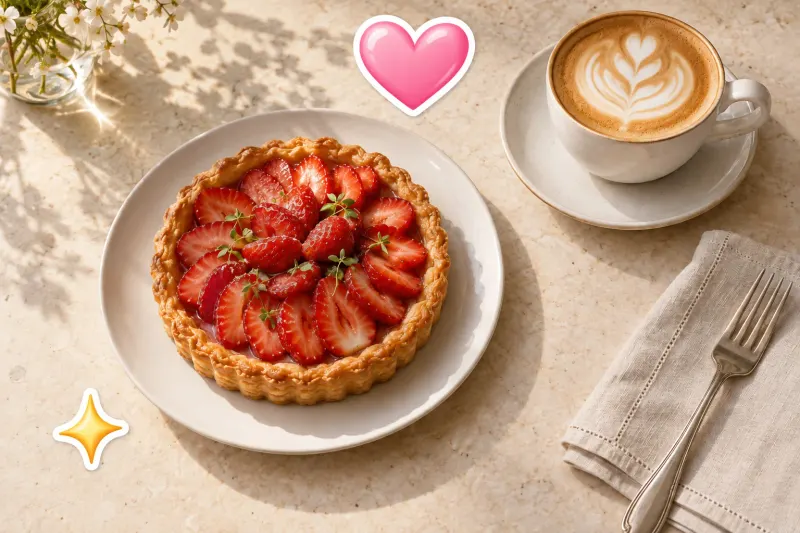
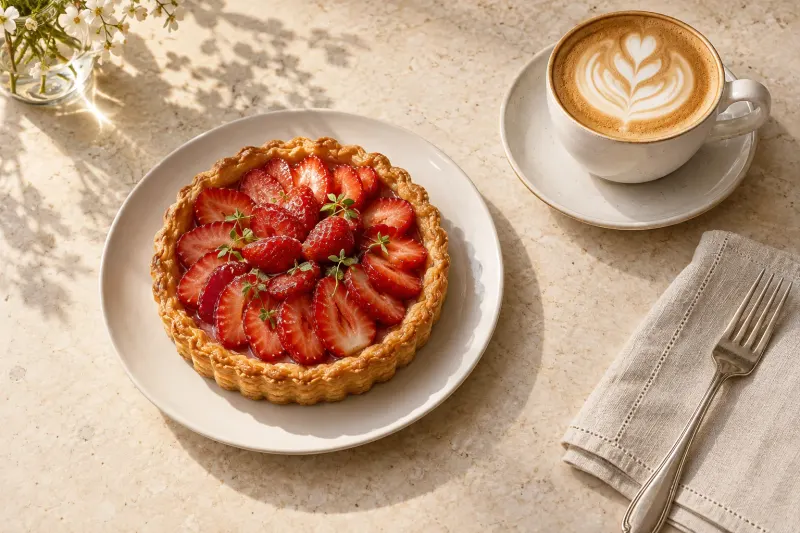
Strawberry tart and coffee, shown with and without decorative heart and sparkle stickers.OriginalEdited
AI example · drag to compare

Start with a photo.

or drop an image here

JPG, PNG or WebP · up to 10 MB
Try an example
You choose what disappearsYour photos stay out of public galleriesSee the difference
WHAT WOULD YOU REMOVE?

An emoji remover for photos you want to reuse

A heart over a café table or a sparkle across the sky can distract from an otherwise useful picture. This emoji remover works on saved images, including photos exported from social apps. It builds a replacement patch from visible context. The result is a new edit, not a recovered layer from underneath the decoration.

Strawberry tart and coffee, shown with and without decorative heart and sparkle stickers.BeforeAfter
AI-generated scene illustration. Your results will vary.
01 / Emoji & sticker

A story photo, ready to reuse

Use the before-and-after illustration to see the kind of cleanup this page supports: decorations on a food photo, with nearby colors and textures continuing through the filled area. Your own result depends on the picture and selection. When you remove emoji from photo backgrounds, inspect the join around the repaired patch as carefully as its center. This digital sticker remover edits image pixels; it does not remove adhesive from printed photographs.

  • Saved stories
  • Emoji overlays
  • Social screenshots
Choose a photo
PHOTOS WORTH KEEPING

Make room for the picture behind the decoration

01

Saved stories and travel photos

Remove emoji from photo backgrounds before reusing a saved story in an album or a new layout. Small icons over walls, sand or open sky give the tool visible texture to work with. Keep buildings, people and horizon lines outside your selection wherever possible. Editing the saved file does not change the post in your social account.

02

Remove sticker from photo exports

The same brush handles decorative hearts, badges and sticker graphics. Cover the whole shape, including a white outline or soft shadow. This is useful when a decoration overlaps a plain tabletop or empty background. If it covers a product label, price or distinctive feature, find an unedited source instead of treating generated detail as accurate product information.

03

Screenshots and personal layouts

Remove emoji from photo screenshots when you need a cleaner image for a moodboard or personal collage. Start with the largest saved copy available. A screenshot already has limited detail, and editing cannot restore resolution lost during sharing. Use the comparison view to check that nearby text, frame edges and other decorations still look right.

UPLOAD. BRUSH. REMOVE.

How to remove emoji from photo in three steps

01

Upload your saved image

Choose a single-frame JPG, PNG or WebP up to 10 MB and 20 megapixels. Use a photo you own or have permission to edit. To remove emoji from photo files exported by another app, save a local copy first. You do not need to connect a social account.

02

Brush over the whole emoji

Paint across the icon, outline and shadow. Zoom in and reduce the brush size near nearby objects. Use the eraser or undo to correct overspill before generating. A focused selection gives the emoji remover a clearer boundary and leaves surrounding texture available as context for the fill.

03

Generate, compare and download

Sign in, check the selected mode and credit cost, then run the edit. Compare the original and edited versions at a useful zoom level. Look for leftover edges or changed shapes before downloading your PNG. If you remove emoji from photo details that are hard to reconstruct, another selection may help, but a new generation costs credits.

Strawberry tart and coffee, shown with and without decorative heart and sparkle stickers.
Your photo. Your focus.AI-generated scene illustration. Your results will vary.
THE DETAILS THAT MATTER

Remove emoji from photo with cleaner edges

01

Include outlines, glow and shadows

Leaving a narrow strip of the original icon can create a colored halo. Brush over those extra pixels without covering a large unrelated area. If the first result has an outline, return to the original and refine the selection. Avoid repeatedly editing a flawed fill, which can carry the mistake into the next result.

02

Use visible texture as your guide

It is easier to remove emoji from photo scenery when the surrounding pattern is simple. A plain wall provides clearer clues than hair, patterned clothing or lettering. Check straight lines and repeating textures after generation. A smooth patch can still be wrong if it bends an edge or duplicates a recognizable object.

03

Keep the original for exact detail

An opaque emoji replaces the pixels beneath it in a flattened image. AI estimates a replacement; it cannot retrieve the actual hidden face, words or object. To remove emoji from photo edits accurately, first check whether you still have the original file or an editable version with the decoration on a separate layer.

Know the output, cost and storage before editing

PNG output, up to 1024 px

The working image keeps its proportions and has a longest edge of up to 1024 pixels. Larger inputs are reduced; smaller images are not enlarged. Downloading gives you a PNG with no added watermark. Check the displayed dimensions before choosing it for print or a large layout.

Credits for each new edit

Standard uses 1 credit and Precision uses 2. Confirmed technical failures refund the edit cost; downloading a completed result does not use another credit. If trial credits are available for your account, they can cover an edit. Check your balance and the current pricing before generating.

Pricing

Private files with a 30-day lifetime

Working photos and results stay in private storage for 30 days, and you can delete them sooner. Processing sends images to an external AI service. Save a local copy of a result you want to keep; task history is not a permanent photo archive.

Privacy policy
GOOD QUESTIONS

Remove emoji from photo: common questions

Can I remove emoji from photo without editing skills?

Yes. Upload a supported picture, brush over the icon and generate an edit. You choose the area; no manual cloning is required. Start with a small decoration on a simple background, then compare the result before keeping it.

Can an emoji remover reveal the real face underneath?

No. If the face is hidden in the saved image, a generated replacement cannot verify the person’s original appearance. Use an unedited photo when identity or accurate facial detail matters. Treat any invented features as an illustration, not a recovered photograph.

Can I remove sticker from photo online free?

You can prepare the image and selection before signing in. AI generation needs an account and credits. Any available trial credits may cover the cost, but unlimited free edits are not promised. Check your balance before you remove emoji from photo or sticker overlays.

What image formats can I use?

Use a single-frame JPG, PNG or WebP within the upload limits. The output is PNG. A search for “remove sticker from image” describes the same digital cleanup workflow; animated images and video files are outside this tool’s supported inputs.

Why is there a blurry patch or colored edge?

The selection may miss part of the border, or the background may lack enough visible clues. To remove emoji from photo surfaces more cleanly, adjust the mask on the original image and inspect the transition. Complex patterns can still need manual retouching.

Can I use this on my phone?

Use a modern mobile browser, choose a saved photo and zoom in while brushing. A smaller brush helps near fine edges. The tool edits your uploaded copy; it does not log into Instagram or modify a published post.

Will my uploaded photo become a public example?

Your working photos and results are private, separate from the page’s illustrative examples. AI processing uses an external service. Download what you need within the storage period, or delete a task sooner from your account.

AI Object Remover

Ready to remove emoji from photo?

Start with a saved image, select one distraction and inspect the result. Keep the original alongside your edited PNG so you can compare or try a different selection later.

Choose a photo